If you want to learn AI from scratch, start with a question you could answer yourself. A small, verifiable task makes it easier to spot what the model gets right and what you still need to check. Write down the question before opening the chat.
Start with a task small enough to finish
A useful first evening with artificial intelligence begins with something on your desk. One customer has asked whether a Saturday pottery class suits a beginner. You have the class notes, a booking page and a half-written reply. You could ask a chatbot to write a wonderful advertisement. A more revealing experiment is to see whether it can turn your notes into an accurate answer to that one person. You know what the finished answer is for. You can tell whether it is right. If it goes wrong, a draft in a notebook costs you very little.
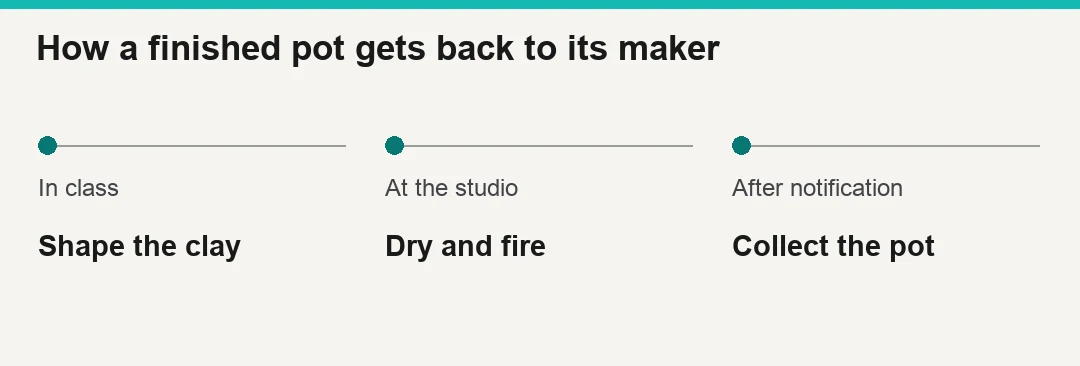
Throughout this field guide, a fictional ceramics studio called River Street gives us something concrete to work on. Its class lasts two hours, has six places, includes clay and firing, and is for adults trying hand-building for the first time. Pieces must dry and go through the kiln. Students collect them later, after the studio contacts them. The studio also sells finished cups, but a cup in the shop and a place in the class are different offers. Those few facts are enough to expose a surprising number of mistakes. You can follow the examples exactly or swap the studio for a project of your own.
Learn AI from scratch with a question you can test
Write down the last three questions a real person asked you about your work. If you are studying, use questions you asked while learning a hobby. “Can I collect my piece on Saturday?” is a good starting point. “How do I grow my business?” contains too many decisions for a first test. If an answer could be beautifully written and you still could not tell whether it helped, make the question smaller. You want to finish the exercise with a piece of work that another person could actually use.
Next to each question, write where you would find the answer without a chatbot. For the collection question, that might be a note from the studio manager. For a product measurement it might be the technical drawing with the latest revision date. With delivery, look for the carrier arrangement currently in force. Pick the question for which you already have a dependable source. This choice teaches a habit that matters more than any particular prompt. Decide how you will check the answer before you ask for it.
Here is a ten-minute test. Make a note of the start time. Answer the question yourself in two sentences. Put that answer aside. Give your source notes and the same question to an AI assistant and write down the time when you finish checking its reply. Count the checking time. A five-second draft followed by a fifteen-minute search for a made-up detail is a fifteen-minute job. On the other hand, a slow first attempt can teach you how to write a brief that will save time on the next ten replies.
Give the model a job and the evidence to do it
A general-purpose language model produces text in response to the material it receives. Its fluent tone is a poor signal of how well a sentence is supported. It can follow a pattern you show it, change the length of a paragraph, group ideas or propose several ways to express a thought. When a date, quantity or promise matters, give it the evidence or ask it to identify the gap. Whether a particular chat has access to an outside source depends on the tool and session. Inspect the evidence for the specific answer in front of you.
Draft a reply to someone asking whether they can take their finished pot home on Saturday. Use only these notes. The Saturday class is a two-hour hand-building session for adults. Clay and firing are included. Students leave their pieces at the studio to dry and be fired. The studio contacts them when their work is ready for collection. Write two friendly sentences. If the notes do not give a collection date, leave the date open.
A reply the customer can use
A credible answer might read, “Your pot stays with us after Saturday’s class so it can dry and go through the kiln. We’ll contact you when it’s ready to collect.” Notice the work those two sentences do. The first answers the immediate question and gives a reason. The second tells the reader what happens next. There is no unearned promise about a particular day, and the reader does not have to interpret an industry term to find out whether to bring a carrying box.
Now change just one fact. Suppose the source says that students must email the studio after three weeks to arrange collection. Keep the rest of the prompt. A good revised reply gives the next action to the student and mentions the three-week interval as an instruction to get in touch. If the response still says the studio will contact them, the model has carried an old fact forward. The exercise trains you to catch stale details whenever you reuse a successful prompt.
Compare two drafts for different jobs
Imagine that the same answer has to appear on a booking page. A private reply can say “your pot” because it has an addressee. A public page may need to tell several people what happens to several pieces. On a booking page, try, “Leave your pieces at the studio for drying and firing. We’ll contact you when they’re ready to collect.” Both versions communicate the process. The difference lies in where and when the reader sees the text. You can use the same source for multiple outputs while giving each one a distinct job.
What each sentence adds
Set two drafts side by side. For every sentence in the first, ask what the reader can now do or understand that they could not before. Repeat for the second. Cross out a sentence if it merely praises the experience. Keep a brief reassurance when it answers a real hesitation. “No previous pottery experience is needed” serves a beginner who is deciding whether to book, provided the instructor has confirmed it. “Our unforgettable creative journey awaits” gives the reader little help deciding whether the class suits them.
Some first projects have no customer at all. A musician might turn rehearsal notes into a list of passages to practise. A volunteer organiser might turn a venue email into an arrival checklist. At home, a cook might use a written recipe to prepare a shopping list and mark ingredients already in the cupboard. In each case, the source, the decision and the test are visible. Changing the subject does not change the method. Choose material you have permission to use and that you understand well enough to check.
Make a record you can learn from
On one page, keep four pieces together: the source you gave the assistant, the exact instruction, the draft it returned and the version you approved. Add a short note explaining your most important edit. “Changed Friday collection to collection after confirmation because the studio has not set a date” is more informative than “improved accuracy.” A week later you can use that note to design a better prompt. You also have an example to show a colleague who will answer the same question.
Avoid selecting a winner by voting on which draft sounds smarter. Ask someone unfamiliar with the class to read the answer, close it, and tell you what they would do next. If they plan to wait for a message, and that is the studio’s process, the copy worked. If they intend to return on Monday because the wording suggested a short delay, find the exact phrase that gave that impression. A real misunderstanding is a better editing brief than a general request to make the tone warmer.
A first exercise with an answer you can check
Imagine a bicycle workshop sends these notes: “Introductory maintenance class. Bring your own bicycle. Tools supplied. Work takes place indoors. Six participants. Instructor demonstrates a puncture repair. Participants practise on a spare wheel.” A reader asks, “Do I need to buy tools, and will we repair my bicycle during the class?” Write an answer yourself. Then ask an assistant to draft one using only those facts. Mark the part of each reply that answers each half of the question.
A defensible answer is, “The workshop supplies the tools, so you can bring your bicycle without buying a tool kit. The instructor demonstrates a puncture repair and you practise on a spare wheel. The notes do not promise a repair to your own bicycle.” If you plan to publish the wording, the last sentence could become a direct question to the instructor first. The useful model output may be the discovery of an ambiguity. You have learned something before making a promise on the booking page.
Try removing one fact
For a harder version, remove “tools supplied” from the notes. A cautious assistant may write a message so cautious that it answers neither question. Restore the useful part: the notes still tell you how puncture practice works. State that confirmed part clearly and ask the workshop whether tools are supplied. Good uncertainty is specific. It identifies the one fact you lack and lets the rest of the work continue.
Finish the chapter by choosing tomorrow’s task. Pick another short communication that uses the same underlying facts in a different place, such as the confirmation email or the class reminder. You will begin to see which facts belong in a reusable brief and which belong only to one message. That distinction will make the next exercise, building a dependable source packet, much easier.
Build a source packet you can trust
The ceramics studio has three versions of its Saturday class description. A printed flyer from last season says there are eight seats. The booking page says six. An email from the instructor says, “Six from September so everyone gets a turn at the demonstration table.” If you paste all three texts into a chat and ask for a polished class description, the assistant has several plausible numbers to choose from. A polished sentence about eight seats is still a mistake. The most valuable five minutes in this project happen before you ask for a draft.
A source packet is a small collection of the material you want an assistant to use for one task. It can fit in a plain text document. Its value comes from the decisions you make about what belongs there. A beginner sometimes copies a whole website because that feels thorough. Old pages can contain discontinued offers, seasonal exceptions, different customer groups or outdated collection rules. Select the few pieces that establish the facts of the current offer. Record enough context that someone else could check your choices later.
Separate a fact from an aspiration
On the left side of a page, write what you could show a customer today. On the right, write what the business hopes to offer later. Imagine that the studio hopes to add a wheel-throwing course next spring. That idea can guide planning, but it cannot support the phrase “learn to throw on the wheel” on the hand-building page. A source packet for the current page should explicitly distinguish the instructor’s present activity from the idea for a future course.
The same distinction applies to adjectives. “Local” sounds simple until you ask what it describes. The studio may be local to its customers while the clay comes from a distributor several towns away. A locally taught class and locally sourced clay are different claims. If a draft describes local materials, the evidence should say where the materials come from. If all you know is the studio address, describe the location of the class and leave the sourcing claim for someone who can substantiate it.
Write the facts as short, complete statements. “Duration: two hours” works for a class brief. “Two hours maximum including breaks?” belongs in a questions list. A note like “short session, probably two hours” mixes a description with an estimate and invites a writer to strip away the uncertainty. Keep the doubt where it cannot be missed. If a fact has an owner, record who can settle it by role, such as the instructor or booking coordinator. Public-facing text rarely needs the owner’s personal details.
Resolve a conflict without inventing a compromise
Consider the question of group size. Averaging the flyer’s eight seats and the booking page’s six would create a seventh seat that does not exist. Choosing the newest file by its computer modification date can also fail. A designer might have saved the old flyer yesterday without changing its text. Look for a source with authority over the particular decision. The instructor’s dated instruction and the current booking inventory agree. Those two pieces together are much stronger evidence than a file that merely looks recent.
Record the decision
In the packet, write a short decision record: “Use six places for the Saturday class. Current booking inventory shows six. The instructor’s September change replaced the earlier eight-seat format. Exclude last season’s flyer from new copy.” That record helps both human and machine writers. If the studio returns to eight seats later, the next editor can tell why six was written and what must be checked before it is changed.
Sometimes the conflict cannot be settled in time. Suppose one source says doors open at 9:45 while another says 10:00, and the coordinator is unavailable. You can draft the rest of the page with the arrival time marked for confirmation. Avoid replacing a missing time with “arrive fifteen minutes early” unless that instruction is verified. Customers arrange buses, childcare and work around even casual-sounding advice. A useful draft makes unresolved details easy to find before publication.
Give examples a clear boundary
A favourite review reads, “I made a bowl that I now use for breakfast every morning.” It is tempting to turn that observation into “Everyone makes a food-safe breakfast bowl.” One person’s experience does not establish the shape or safety of every finished piece. A sample illustrates a possibility. A product specification establishes what is included or guaranteed. Give these categories separate headings in the packet. An assistant that receives a glowing review under “mandatory product specifications” has been given the wrong editorial signal.
Use a fictional example when discussing a customer question would otherwise require private information. “A visitor taking the train wants to know whether the finished pot can travel home the same day” provides enough context. Their full name, ticket number and home address have no role in the exercise. If you need to test whether an assistant can preserve the spelling of a name, invent one for the test and mark it as invented. This keeps the exercise reproducible and avoids spreading details that people gave you for another purpose.
To demonstrate tone, include a paragraph you own and name the traits you want to carry across. “Use a direct first sentence, talk to the reader as you, and explain the next step in ordinary words” is more workable than “imitate this famous writer.” If you like the rhythm of a sample, identify the rhythm. If you like its specificity, point to a concrete fact. The assistant can then apply those traits to original wording that fits your business.
Set up a source ledger
A ledger can be a four-column table headed Claim, Evidence, Status and Next review. Fill it with five claims from a page you plan to draft. “Six places” points to the booking inventory and carries a confirmed status. “Materials included” points to the current class description. “Ages sixteen and over” receives a question mark if your only source says adults. “Step-free entrance” remains unconfirmed until the venue supplies the relevant access information. “Suitable for people who have never worked with clay” points to the beginner class brief.
The next-review field does a different job for each claim. The stock count can change during an afternoon, so avoid a fixed claim about how many places remain unless it comes directly from live inventory. Class capacity can remain stable for a season. The studio’s contact method may stay the same for months. Write a review trigger as well as a date where useful. “Review when the studio changes venue” is more meaningful for travel directions than an arbitrary monthly reminder.
Check each promise
Read this packet as a fact checker. List each concrete promise a customer could rely on. For each, quote the short piece of evidence that supports it or write “unconfirmed.” Keep conflicting statements separate. Finish with the three questions whose answers would change what the customer does.
The output of that prompt is a draft ledger. Check that quoted evidence actually appears in your packet. Check the scope as well as the words. “Saturday classes include firing” does not by itself establish that a different weekday package includes firing. If the output blurs the two, label every source with its product, audience and date before asking again. A cleaner packet often fixes a problem that a longer prompt would merely describe.
Try the repair counter exercise
A bicycle repair counter has these notes: “Inspection appointment, thirty minutes. Mechanic explains the fault and gives an estimate. Replacement parts charged separately. Bring the bike in person. Monday email: customers may leave the bike after inspection if repair space is available.” An older poster promises “same-day repair.” A new customer asks if booking an inspection guarantees they can cycle home on a repaired bike that evening. Make a packet small enough to fit on an index card, then write the answer.
The inspection duration, estimate and separate parts charge belong under confirmed facts. The possibility of leaving the bike belongs under a condition. File the older poster under a conflict, with a question for the shop about when its promise applied. A suitable first reply explains that the booking covers an inspection and estimate. It can add that the bike may stay for repair if space is available. A guarantee of completion that evening would require a different source.
Reduce the button to one action
Now imagine that a colleague asks for a shorter version for a booking button. The button might read “Book an inspection.” Its surrounding line can explain that repairs are quoted separately. Shortening the text to “Book a repair” changes the offer. The ledger lets you catch that change even though the revised button sounds perfectly normal. This is one reason to preserve the wording of the underlying customer action in your packet.
Before moving on, put the packet and ledger in a place you can find again. Name the packet for the offer and occasion, such as “Saturday hand-building class, current booking page.” At the top, give the date you checked it. At the bottom, leave a short list titled “Waiting for confirmation.” A colleague should be able to draft something useful from the confirmed section today and know exactly which questions still need an answer.
Write prompts that leave room for judgment
A prompt is a set of working instructions. You do not need an incantation or a job title that makes a model behave like a world expert. You do need to decide what you are making, what material it can use, who will read the result and what would make the draft unacceptable. If those decisions are unclear to you, a sensible first use of the assistant is to ask for clarifying questions. You can learn as much from a good question as from a finished paragraph.
Take the studio’s booking reminder. “Write an email about the pottery class” leaves the assistant to choose between attracting new students and preparing people who have paid. Those readers have different questions. A prospective student wants to know whether the class suits them. A booked student wants to know when to arrive, what to bring and what will happen to the piece afterward. Name the moment in the relationship. That one detail often improves a draft more than a long list of tone adjectives.
Build a brief from four decisions
Start with the deliverable. “Write the body of a booking reminder, including a subject line” tells the assistant where each piece belongs. Next describe the reader. “The reader booked last week and may be coming straight from work” gives a practical reason to mention clothing or arrival instructions, but only if the source provides them. Next supply the source packet. Finish with an acceptance test, such as “The reader should be able to tell whether to take their piece home after class.”
In your first draft of the brief, underline every adjective you could not test. Friendly, premium, intuitive, polished and engaging all leave substantial room for interpretation. Replace one of them with an observable instruction. “Use the reader’s first name if supplied and put the answer before the explanation” is testable. “Make it super engaging” might lead to a string of exclamation marks. Keep an adjective when you genuinely want different interpretations, as in an early brainstorming exercise. Tighten it when you are preparing copy for a specific use.
Write the reminder
Write a booking reminder for an adult who already has a place in River Street’s Saturday class. Use the facts below and keep the whole email under 100 words. Give the reader a short subject line and two paragraphs. Explain what they do during the class and what happens to the finished piece. Put any unanswered practical question in a separate note for the organiser. Do not put that note in the email.
With only the original studio facts, the assistant cannot tell the reader the precise start time or address. A good organiser’s note asks for those facts. If the assistant fills in “10 a.m. at our downtown studio,” mark those details as unsupported even if they would make the email feel complete. You can then give the confirmed time and place in a second pass. Separating the message from the organiser’s note gives a reviewer a clean draft and a visible list of missing information.
Show what a useful output looks like
Suppose you want a short list of reader questions and the evidence needed to answer them. An example row can save several rounds of correction. “Question: Can I collect on the day? Evidence needed: the studio’s drying, firing and collection process.” The example teaches the structure without deciding all of the content. If every generated row simply repeats the class collection issue in different words, give a second example from a different part of the process, such as class eligibility.
Examples can also hide an error. If you provide three testimonials as examples of the style you like, an assistant might invent a fourth testimonial in the same voice. For public material, label examples by purpose: “These are examples of sentence length. Do not create customer quotations.” If you need a practice testimonial to test a layout, label it explicitly as a fictional placeholder and remove it before the page goes live. A placeholder may look like evidence to a visitor if its status is lost in the design.
Ask for the smallest output that supports your decision. If you are choosing a headline, request three headlines and one sentence explaining the factual difference between them. A page, a campaign plan and thirty slogans at once may feel productive, but you will have to assess every claim before using it. Reducing the output can improve both quality and attention. You have made the assistant’s job smaller and your own review job possible.
Use the second turn to change one thing
Imagine a first draft that correctly explains collection but opens with “Unleash your inner artisan in a transformative experience.” The facts do not need to be regenerated. Ask the assistant to replace just the opening with a plain description of what a beginner will do with their hands. Preserve the rest. Compare the old and new versions. If the new draft quietly changes six places to eight, you have found a second problem: the assistant treated a local edit as permission to rewrite the whole text.
In a spreadsheet, put the bad opening beside the repair instruction and the accepted version. “Replace a broad emotional claim with an observable activity” is a more reusable lesson than “avoid the word transformative.” The next draft might use “life-changing” instead. Your instruction should address the underlying error. A practical sentence such as “Press the clay into a small dish and shape its rim by hand” makes a promise only if the instructor really teaches those actions, so verify the activity as you would any other fact.
A useful editing sequence is extraction, drafting, then review. First ask the assistant to list confirmed facts. Correct its list yourself. Then ask it to write the draft using that list. Finally, open a fresh chat, present the approved facts alongside the draft, and ask which sentences go beyond the evidence. A fresh conversation can reduce the influence of earlier assumptions, but it does not make an independent expert. For facts that matter, the authoritative comparison is still the one you perform against the source.
Diagnose an answer that keeps missing the point
When a third or fourth attempt looks much like the first, stop changing adjectives. Read the source packet and ask whether it contains the material you want the model to express. You cannot prompt a workshop’s parking arrangements into existence. If you need a useful sentence but lack a fact, change the task from “answer the question” to “draft the shortest question we should send the venue.” The resulting output may be a single sentence that unblocks the rest of the work.
If the material is present, examine its location. A long chain of copied emails may bury a new instruction beneath several replies quoting a superseded plan. Extract the two relevant sentences, label the decision date, and discard the duplicated replies from this task’s input. This is different from deleting the original record. Keep your evidence intact outside the chat. The packet is a deliberately selected working view, and another task might need a different selection.
If the answer is correct but unusable, look at the requested format. “Give me some ideas” often returns labels such as convenience, creativity and community. Those labels do little for a designer. Try “For each idea, give me one photograph the studio could take, one question the image answers, and a caption under twelve words.” Now a colleague can decide what to shoot. You have translated a vague creative problem into choices someone can actually make.
A prompt repair clinic
A florist sends a poor prompt: “Make us the best campaign in town. Be persuasive. Customers love our flowers.” The shop’s confirmed offer is a hand-tied seasonal bouquet available for collection on Friday between four and six. Colours vary with the week’s delivery. Orders close on Thursday at noon. Create a prompt for a short booking-page section. Include an instruction that will prevent the model from showing an exact bouquet as a promise of what the customer receives.
One strong solution names the reader as someone deciding whether Friday collection works for them. It asks for a heading and two short paragraphs, requires the order deadline and collection window, and describes photographs as examples of a previous bouquet. It instructs the assistant to avoid naming stems unless the shop confirms them for this week. The test is whether a reader can answer three questions: when to order, when to collect, and whether the exact colours are guaranteed. A draft can pass those tests in several styles.
Now revise the same prompt for someone who has already ordered. The deadline can disappear. The collection window becomes the first practical detail, and the shop may wish to add where to collect once that address is confirmed. This exercise reveals which parts of a prompt belong to the offer and which belong to the reader’s situation. Save both prompts under names that make that distinction obvious. The next time someone says “reuse the florist prompt,” you will know which version they mean.
Check facts, numbers and missing information
An assistant can repeat every number in a source and still reach the wrong conclusion. If a studio sells six places at 40 each, 240 is the maximum ticket revenue for that session at that price. It is not the profit, because the calculation says nothing about clay, firing, payment fees, the instructor or the room. It is not even the expected revenue if the class regularly sells four places. Before checking arithmetic, identify the quantity the claim is supposed to describe.
A useful review begins with a pencil, a calculator and a copy of the draft. Circle every number, underline every promise and put a small question mark beside every comparison. “Twice as popular,” “ready sooner” and “more economical” all require something to compare against. An assistant may have expanded an ordinary fact into a comparison simply to make the writing lively. Work through the marks one at a time. A clean sentence without a mark beside it can still be wrong, but this first pass catches many costly errors quickly.
Keep the unit attached
A venue lets the studio use a room for 90 per session. The invoice for clay is 48 for enough material for twelve students. It would be easy to write that each class costs 138 before labour. That assumes one class uses all twelve portions. For six students, the clay allocation is 24 if each student uses an equal portion. Under those assumptions the room and clay together cost 114 for a full six-person session. Write “per session,” “per twelve students” and “per student” beside the inputs. Units expose the error before impressive-looking totals conceal it.
Compare costs at half capacity
Try changing attendance to three. Room cost stays at 90 if the booking agreement is fixed. Clay allocation falls to 12 under the same usage assumption. These two costs together are 102. Per attendee, that is 34, compared with 19 when six attend. The example says nothing about what the real studio should charge. Its purpose is to teach you which quantities move and which stay fixed. Ask an assistant to explain that distinction in ordinary language, then check every number with a calculator.
A customer-facing price needs an equally careful label. “40 for the class” could mean per person, per group or per family. A template that removes “each” to save space can make the offer ambiguous. Give your assistant one sentence of price notation that it must preserve, and verify the visible page, advertised copy and checkout all refer to the same product and unit. When working across currencies, keep the original currency code alongside the amount in the source. Punctuation alone is a poor way to distinguish markets.
Distinguish an observation from an explanation
The studio’s booking page had 120 visits last week and 90 this week. That is an observed change in the recorded visits. “People lost interest because the headline is weak” is an explanation for which you have supplied no evidence. The studio may have sent an email last week, the site may have lost a traffic source, or the measurement itself may have changed. Ask the assistant to write separate lists for what the data shows and what you would need to investigate. It is easy to confuse a plausible story with a discovered cause.
A question for a colleague
You can turn that distinction into a useful question for a colleague. “Did any promotion or tracking setting change between the two weeks?” invites evidence. “Why did the new headline fail?” assumes an explanation before anyone has checked it. If the team changed the headline and the advertising budget on the same day, you cannot use that simple comparison to isolate the effect of either change. You can still record what happened and design a cleaner comparison next time.
A percentage needs a denominator. In a fictional week, four of twenty booking visitors completed payment. In another, six of sixty completed it. The studio gained two paid bookings, while the share of those visitors who bought fell from twenty percent to ten percent. Both statements can be true. A summary that says “performance doubled” without naming the measure will mislead someone. Ask the model to express each result as a count first, then as a proportion with its denominator written out.
Follow a citation all the way to the claim
Suppose an assistant supplies a link to a platform’s help centre underneath a detailed statement about how an advertising feature works. Open the page and look for the specific statement. A genuine domain is a good start but does not establish that the cited page supports the claim. A document about campaign objectives may never discuss the particular account restriction the assistant mentioned. Simply linking to a general help centre gives you almost no evidential value for a narrow claim unless you can find the relevant section.
Record a short paraphrase of what the source does say, the date you checked it and any condition that changes the answer. The condition often matters most. Features may differ by region, account type, payment method or software version. If a reader can complete the task using a stable principle, teach that principle and direct them to the current first-party instructions for the changing interface. A screenshot of last year’s button is less helpful than a precise description of the outcome the reader needs to verify.
An absence of evidence is a reason to adjust your draft. If you cannot confirm that every learner receives a certificate, remove the certificate promise or ask the course owner. Do not replace it with “you may receive a recognised certificate,” which still plants an expectation. Be definitive about the part you know. “You complete three projects and keep your own workbook” can be a strong explanation of value when those things are actually included.
Audit a draft in two passes
The first pass checks substance. Read the draft sentence by sentence against the packet. Mark each sentence supported, unsupported or conditional. Conditional statements can stay when the relevant condition is visible to the reader. “You can leave the bicycle for repair if the workshop has space” preserves the condition. “Leave the bicycle with us for repair” removes it. A model’s shorter answer may have become less accurate even when every word sounds harmless.
The second pass checks the reader’s likely interpretation. A line can be technically supported and still create the wrong picture. “A finished pot is included” might make someone expect a fired object at the end of the same afternoon. “Make your piece during class, then leave it for firing and collect it after we contact you” places the events in order. A reviewer who already knows the process may miss the ambiguity. Ask someone unfamiliar with it to explain the sequence back to you.
Check the draft against the evidence
Read this draft beside the approved facts. Identify each number, date, comparison and promise. For each, give the exact source fact or write “missing.” Then name one plausible misunderstanding a first-time customer might have. Do not repair the draft until the review is complete.
The advantage of delaying the repair is that it preserves the diagnosis. If the assistant silently fixes a problem while reviewing, you may end up with a better paragraph but no idea which instruction failed. Save the marked-up draft, not just the clean one. After several tasks, count the kinds of errors you found. If invented times appear repeatedly, your prompt and template need a clear place for time-related uncertainty. If the mistakes are mostly arithmetic, change the workflow so the numbers come from a checked calculation.
Practice with a short evidence puzzle
A print studio offers a poster workshop. Its notes say “twelve places available across two identical sessions; each session lasts ninety minutes; paper supplied; one poster printed per participant.” A draft advertises “a three-hour workshop for twelve people, including all the posters you can print.” Write down what went wrong before reading on. Every part of that sentence resembles a source detail, which is exactly why the error can slip past a quick review.
The draft adds the lengths of two sessions as though one learner attends both. It interprets the overall capacity as the size of a single session. It changes a one-poster limit into unlimited printing. A careful description might say, “Choose one ninety-minute poster workshop. Paper is included, and each participant prints one poster. There are twelve places across the two sessions.” It should not promise six places in each unless the studio confirms an even split. Identical teaching sessions do not by themselves prove identical booking inventory.
For a final test, ask the assistant to give you a plausible but wrong summary of the same notes and label it as a practice error. Have a colleague find the mistake without seeing the label. Use the exercise for training, keep the examples away from publication and delete misleading drafts from the folder used for live copy. Learning to recognise a believable error is a skill you can carry into every later chapter, whether the output is a website, an advertisement or an internal report.
Turn customer questions into a useful brief
A business often starts a writing project with what it wants to say. A visitor arrives with something they want to decide. The gap between the two is where many AI drafts go wrong. River Street wants to talk about the history of its studio. A person looking at Saturday’s class wants to know whether they will be the only beginner in the room. The history may belong on the site. It does not answer the question standing between that visitor and a booking.
You can discover useful questions without sending private customer records to a chat service. Read a small sample of enquiries you are allowed to review. In your own words, note the underlying question, remove identifying details and keep the occasion. “First visit, coming alone, worried about previous experience” is useful. A copied conversation with a name, order number and personal history is usually unnecessary. Your task here is to understand decisions, not to build a dossier on individual people.
Sort by the decision the reader faces
On six slips of paper, write these questions: “Do I need experience?”, “Can I come on my own?”, “Will I use a wheel?”, “Can I collect my pot today?”, “Does the price include firing?” and “What should I bring?” Ask an assistant to group them, then do the exercise yourself. There is no single correct arrangement. A teaching plan might group them by technique, materials and administration. A booking page might group them by suitability, what happens during class, what is included and what happens afterward.
The second arrangement is often easier for a prospective student because it follows the order of a decision. First they establish whether they belong in the room. Then they imagine the afternoon. Then they work out the total commitment and what they will take away. Label your categories with ordinary questions that someone might actually ask. A heading such as “Participant suitability and service fulfilment” makes sense to an organisation chart and very little sense to a visitor on a phone.
Count questions with care. If one visitor asks about firing three times in a thread, that is strong evidence that the answer was unclear for that person. It is not three independent customers asking the same question. A count based on five recent enquiries gives you a useful place to start. It does not justify writing “most customers worry about firing” on a public page. In your brief, distinguish the number of examples you saw from the wider claim you might be tempted to make.
Describe a situation instead of inventing a persona
A common exercise asks a chatbot to invent an ideal customer with a first name, age, job, salary and favourite coffee. Such a character can sound vivid while telling you little about the page. For the studio, “someone booking a first hands-on activity with a friend, using a phone on a lunch break” gives the writer more practical guidance. It explains why the booking steps need to be short and why prior experience must be addressed. It does not pretend to know the visitor’s income or personality.
Create three situations for your own offer. One person may be comparing two providers. Another may have decided what to buy and need to check a detail. A third may already have purchased and be looking for instructions. Give each situation a starting question, an obstacle and a next action. If the three next actions are identical, check whether you have actually described three different situations. Someone who has paid should not have to buy again to find an arrival time.
Group questions by decision
Here are six anonymised questions about a beginner pottery class. Group them by what the visitor is trying to decide. For each group, name one fact that would help and one action the visitor can reasonably take after reading it. Do not infer age, income, background or motivation beyond the words supplied.
Review the result by asking whether every proposed fact exists in your packet. “Show photographs of beginners’ finished work” might be a good idea, but you still need suitable images and permission to use them. “Mention the studio’s free parking” would be a new factual claim if the packet says nothing about parking. A useful brief can include a request for new evidence. Mark it as an editorial task, separate from confirmed copy for publication.
Write the promise at the right scale
The offer’s promise should connect an activity with an outcome the provider can actually deliver. “Join a two-hour hand-building class and shape a piece for firing” is narrower than “become a ceramic artist in an afternoon.” The narrower promise gives the visitor a clearer picture of the experience. With a digital course, the same reasoning applies. A course can give a learner practice writing a brief, building a page or setting up a campaign. Sales, profit and search positions depend on much more than completing the lessons.
Connect promises with evidence
Make a two-column list headed Promise and Evidence. Place “six places” beside the confirmed booking capacity. Place “beginner-friendly” beside a description of the instructor’s starting demonstration and the steps beginners follow, if you know them. A label becomes stronger when the page shows the reader why it fits. If the only evidence for “beginner-friendly” is the class title, say it is an introductory class and ask the instructor to describe the first ten minutes.
Pick one promise to lead the page. A kitchen knife workshop could teach sharpening, include practice steel and offer a supervised session for people unfamiliar with whetstones. A headline that tries to include every feature may be hard to read. With a focused headline, you can tell the visitor what they will learn. The following sentence can explain the setting and what is included. Ask an assistant to present two possible leading promises, then decide which is most faithful to the reason people choose this particular workshop.
Build a brief another writer can use
Give a colleague the following assignment: “Write a landing page for our studio.” Now imagine receiving the assignment yourself. You would probably ask which class, for whom, how people book and which details are confirmed. Put the answers on one page with short headings for the offer, reader situation, evidence, action and open questions. Keep the current terms of the offer close to the action. A promising line about a walk-in class should not sit beside a book-now button if all places must be reserved.
Define what the brief excludes
Add one explicit exclusion. For River Street, “This page describes hand-building; leave wheel throwing for the separate future course.” For a repair counter, “This appointment is an inspection; a repair is quoted separately.” With a digital course, “Videos and worksheets belong to enrolled students; show the visitor what the course covers without publishing their private dashboard.” A scope line helps writers and designers avoid accidental promises. It is a working instruction, and it need not appear verbatim on the page.
End with a single test question. “Could someone tell whether they need previous experience and how their pot gets fired?” is better than “Does it feel premium?” Give the test to the reviewer before they read the draft. You will get feedback on the task you actually need the page to perform. If the reviewer instead discovers a more important missing fact, revise the brief itself. The point of a brief is to guide good judgment, not to prevent it.
A case of two different buyers
A community garden sells places in a seed-starting class and also rents garden plots. Suppose a visitor asks, “Can I start growing if I don’t have a garden?” Either way, a chatbot could reasonably associate the question with either offer. Write two short briefs, one for the class and one for the plot application. The class brief needs information about containers, what seeds are supplied and what participants take home. The plot brief needs availability, location and the application process. Both begin with the same customer question, yet the pages have different jobs.
A useful response might first explain that the workshop teaches container growing if that fact is confirmed, then link to the separate plot information for people who want outdoor space. Combining both offers into a single “Start growing today” button forces the visitor to discover the distinction after clicking. A clear brief prevents that design error before anyone starts drawing a layout.
Take your own three reader situations and underline the words that identify the intended action. If you cannot underline an action, the brief is still describing a topic. Give the reader a decision they can finish. The next chapter turns that decision into a page outline you can build and test.
Shape a page around one reader decision
Lay a sheet of paper on the table and fold it into four panels. The first panel tells a visitor where they have arrived. The second helps them recognise whether the offer is for them. Next, explain the details they need to decide. Finally, give them a way to act or ask a question. A real website can have more sections. The paper exercise forces you to prioritise before you start discussing colours, fonts or clever effects with an assistant.
For River Street, the first panel could say “A Saturday pottery class for first-time makers.” The second could show what hand-building means in practice. The third could explain the session length, six places and collection after firing. Finally, the fourth could lead to a booking. Someone who is ready to book immediately should also be able to find the action near the top. A page outline establishes a reading order, but visitors should not have to prove they have read every word before reaching a button.
Start with the sentence the page must earn
Write one sentence a visitor should be able to say after reading the page. “I can join this two-hour beginner class, make a piece by hand and collect it after firing” is specific enough to guide the content. Then test each section against that sentence. A photograph of hands shaping clay helps the reader picture hand-building. A long paragraph about the studio founder’s unrelated exhibition history may have a better home on an about page. Editing at this stage costs much less than removing a beautifully designed section later.
Ask an assistant to propose two outlines, one for a visitor who knows the studio and one for a first-time visitor arriving from a search. Compare their first three sections. A returning visitor may need little introduction to the place but still needs the current class details. A new visitor may need to know who teaches and where the class happens. You can usually serve both with one concise opening and clear section headings. Two audience situations do not automatically require two nearly identical pages.
Give every outline item an evidence requirement. A paragraph about what is included needs a reliable list. A photograph of a finished piece needs a caption that distinguishes an example from a guaranteed result. Using a customer review requires permission and accurate attribution. An assistant can suggest “add social proof” indefinitely. The outline becomes useful when you can name the actual evidence you will use or decide to leave that section out.
Write headings that carry information
A visitor scrolling quickly may read only the headings. Read yours aloud, in order, with the paragraphs hidden. “Welcome, discover more, explore, join us” tells you little. “What you’ll make, what the class includes, when you collect your piece, reserve a place” gives a usable map. Headings can still have character. A section called “What happens to the clay after Saturday?” sounds like the studio because it addresses a real question in the language a visitor might use.
Use one descriptive main heading for the page and organise subsections by meaning. A bold paragraph can look like a heading to a sighted reader while offering no heading structure to someone navigating by assistive technology. Conversely, making every price, slogan and pull quote a heading creates a noisy outline. Before finalising the page, inspect the actual heading levels in the editor or browser. They should describe the relationship between the parts even if the visual design changes later.
An assistant can help shorten headings. Give it the paragraph and ask for three headings, each under seven words and each identifying a fact or question the paragraph answers. Check each suggestion against the paragraph. “Collect your pot next week” is wonderfully concise and wrong when the timing depends on the kiln. “When can I collect my piece?” lets the paragraph explain the real condition. Do not reward brevity that removes uncertainty a visitor needs to understand.
Connect a button to the next screen
Draw an arrow from each action on the outline to its actual destination. A button marked “Reserve a place” may open a date picker, a payment page or a request form. Those are different experiences. If the first click sends an enquiry and the booking is confirmed later, say so. If a visitor is about to pay, show the price and payment arrangement before sending them away. A specific label makes the transition less surprising and gives you a clearer basis for testing.
Try the button-label exercise with three destinations. For a list of available Saturdays, “Choose a class date” sets a sensible expectation. For a secure course checkout with a displayed total, “Continue to payment” tells the visitor what comes next. On a page meant for existing students, “Sign in to your course” tells newcomers that enrollment is a different action. An assistant may propose the same fashionable label for all three. Your job is to name the actual transaction or decision.
Consider the reader who cannot complete the main action. Perhaps all dates are full, a booking window has closed or the visitor has a question about access. Give them one useful next step that your team can support. An empty calendar with an active “Book now” button wastes attention. A short notice explaining that dates are full and giving the real waiting-list process respects the visitor’s time. If there is no waiting list, avoid inviting people to join one simply because the page template has a spare button.
Draft the opening at three lengths
Write the offer in ten words, then thirty, then eighty. The ten-word version forces you to choose what matters. The thirty-word version makes room for an important condition. With eighty words you can give a concrete example. Give the same exercise to an assistant and compare the results. If the shortest version could describe a cooking class, a gallery opening or a fitness session without changing a word, add a concrete noun and verb.
For example, “Shape a clay vessel by hand in a Saturday class” gives the reader something to picture. A longer version can explain that the session is for adults trying hand-building, and that pieces stay behind for firing. An even longer version might describe the first stage of the class once the instructor confirms it. Do not force all three lengths onto the same page. Use the short one as a heading, the middle one as a search snippet candidate and the long one as a draft for a section that needs the detail.
To check tone, imagine reading the opening aloud to someone who has walked into the studio. Would the instructor really promise “a journey of boundless transformation”? Could they say “You’ll learn to shape the clay by hand” and point to the table? A page can be warm without asking readers to believe an emotional outcome in advance. Let the physical detail and sequence of the experience do some of the persuasive work.
Test the outline before designing it
Give your folded paper to a person who has never seen the class. Ask them to point to where they would find three answers: whether a beginner can join, what happens to the piece afterward, and how to reserve a place. Do not explain the labels while they search. If they overlook a heading because it sounds decorative, revise the heading. If they find the correct section but still cannot answer the question, revise the content. Those are different problems and they need different remedies.
For an independent exercise, outline a page for a fictional bookbinding class. The source sheet says each participant makes one stitched notebook, materials are supplied, the class lasts ninety minutes, and participants take the book home that day. Compare the outline with the ceramics version. The collection section may disappear because the notebook goes home immediately. A section on what participants make might deserve more prominence. A template is a starting shape, and the facts should decide which sections survive.
Save the simplest outline that passes your reader test. Mark the place where each photograph, example or button will go. When you start building in WordPress, work from this outline and the approved source packet. You now have a practical defence against an attractive page that forgets to answer the original question.
Build and test a WordPress draft
Open a draft page on a site where you are allowed to edit. Give the page a working title that distinguishes it from a live booking page, especially if several people use the same WordPress installation. Keep the public page in a separate tab for reference. Before pasting anything, identify which parts of the page come from its content and which come from the theme or a plugin. A logo, navigation bar or footer may be shared by the whole site. Changing a shared template to fix one heading can affect pages you never intended to touch.
Work with the simplest editable structure available on your site. On a block-based page, that might mean a heading, a paragraph, an image and a button grouped into sections. Some sites use a page builder or a custom template that renders particular fields. If the public page looks nothing like the editor content, investigate that relationship before rewriting the draft. Saving a perfect paragraph in a field the template never displays will not help the visitor.
Turn the outline into actual reading order
Build the page in the same sequence as your approved paper outline. Add the actual headings and paragraphs before spending time on spacing. Use the editor’s structure or list view, where available, to see the order independently of the visual layout. A desktop design with two columns might place the booking button above the explanation on a phone. Read through the mobile order from the top, following the actual sequence rather than the intended composition in your head.
If the page has a wide image beside a short paragraph, check what happens when the image becomes a separate row. Is there a long empty gap? Does the caption remain close to the image it describes? Does a visitor have to scroll past a large photograph before discovering which class they are viewing? An assistant can propose a layout, but you can answer these questions only by opening the page at a realistic size. Use at least one narrow screen and one larger screen, plus a real phone when you can.
Keep the first screen legible with a long title. A beautiful heading in English may wrap very differently in French or Portuguese. Resize the browser slowly and watch for the point at which a word, price or button leaves its container. Do the same with a longer translated button. A flexible component lets the text wrap and the container grow. A fixed-height hero that clips a second line has made an editorial problem out of a layout assumption.
Choose an image for the question it answers
For the ceramics class, an image of hands pressing clay can explain hand-building better than a gallery photograph of several finished pieces. The gallery photograph answers a different question about possible outcomes. Put each where it serves the reader. If one picture shows a pottery wheel, a visitor might infer the class involves wheel throwing despite the text. An attractive image that contradicts the source packet can undo careful writing in a glance.
Write a short description of the image for someone who cannot see it when the image contributes information. “Hands pinching the rim of an unfired clay bowl” describes the relevant gesture. An image that is purely decorative can be handled as decoration so that it does not add unnecessary narration. Avoid using alternative text as a place to repeat keywords. The test is whether the description conveys the information the reader would otherwise miss in that part of the page.
Prepare an image size appropriate to the space it occupies. A small author portrait does not always need the same file as a full-width gallery image. Check the file actually delivered on a phone and the dimensions the layout reserves before it loads. If text jumps downward when the photograph appears, specify dimensions or an aspect ratio in the layout. A smaller file can still cause a disruptive jump when the space for it was never reserved.
Make the journey beyond the page explicit
Preview the page and click each link that belongs to the normal visitor journey. The booking action should reach the right product in the right language and currency. A link in the footer should still work after the visitor switches languages. A support link should lead somewhere a real person or documented process can help. If the page is private or in draft, use the preview and an authorised testing environment for actions beyond it. Do not place a real order just to prove that a button is clickable.
Treat the browser’s back button as part of the journey. A visitor might review the price, return to read the class details and then decide to continue. Check whether they land in a sensible place, whether the order total stays consistent and whether the interface makes it clear when payment has actually occurred. A thank-you page should correspond to the intended payment state. A casual visit to a confirmation URL is not evidence that money changed hands.
Ask an assistant to turn your outline into a test script for someone who did not build the page. Give it the real destinations and expected states. A useful script says, “From the class page in French, open the booking action, record the currency shown, then return to the class details.” A vague script says, “Make sure everything works.” Refine each step until the tester can record an observable result. The same script can then catch regressions after a theme or plugin update.
Read the draft with the screen out of your hands
Put the phone on a table and attempt to reach the main action with one finger while reading at a comfortable distance. Text close to the edges, small controls or faint labels become easier to notice. Increase the browser text size and check that the content still flows. Navigate important controls using a keyboard where your device supports it. You should be able to see which element has focus and activate an ordinary link without depending on a hover effect.
Look for failure messages as carefully as successful actions. If a visitor leaves a required field empty, does the message identify the field and explain how to continue? If a date becomes unavailable, can the visitor find a different date? A bare red border may be invisible to some users or meaningless without a label. Test a harmless validation error in an appropriate test environment. Never put invented personal or payment details into a live transaction merely to create an error.
Before publishing, read the page once without the admin toolbar, edit buttons or logged-in privileges if you can. A site owner may see an “Open dashboard” link where a guest sees “Enroll.” The owner’s version is useful for checking one state and misleading for checking the other. Record which state each test used. If you cannot access a genuine guest view, identify the gap and avoid claiming you tested what a new visitor sees.
Fix a broken page in the smallest useful step
Imagine that the mobile booking button is partly outside its container. An assistant suggests replacing the entire hero section. Start with a smaller question: which element is wider than its parent, and under what condition? Perhaps a long translated label has been told never to wrap. Changing that one constraint and allowing the button to grow vertically may solve the problem while preserving the rest of the design. A broad redesign makes it harder to tell what fixed the fault.
Keep a short before-and-after record. Name the page, device width, language and action that exposed the problem. Save a screenshot or a plain description. After making the change, repeat exactly the same test and then check a neighbouring language and screen size. If a new problem appears, you have two specific observations to compare. “The page feels off” is a hard brief for anyone. “At a narrow width the French button clips its last word, while the English button fits” is actionable.
For practice, build a private sample section for the bookbinding class from the previous chapter. Include the notebook title, the take-home timing, one relevant photograph and an action leading to a harmless preview destination. Ask a second reader to explain what they would receive and when. The important result is not how closely the page resembles a fashionable template. It is whether the visitor can carry out the decision your outline promised to support.
For a walkthrough of the editor, follow the lessons at Learn WordPress.
Make advertising ideas that differ in substance
Three advertisements can look different and still test the same idea. Picture three headlines for the pottery class: “Discover creativity,” “Unlock creativity” and “Find your creative side.” If one performs better, the studio learns very little about what persuaded the reader. Now compare three questions: “Can a beginner do this?”, “What will I actually make?” and “Can I fit this into Saturday afternoon?” Each asks for different evidence. An assistant can help you develop three genuinely different creative approaches by starting with those questions.
A creative approach is a specific way to present the same offer. The underlying facts and price stay consistent. The first approach might show the instructor demonstrating how to start with a ball of clay. Another might follow one piece from the worktable to the kiln shelf. Finally, you could show the two-hour session in the context of a weekend plan. Choosing the right evidence matters more than changing the colour of a headline. Decide what the reader needs to see before you ask for variations.
Give every idea a photograph, a sentence and a test
For each idea, draw three boxes on paper. Label them “What the reader sees,” “What the reader learns” and “What I can check.” For the beginner question, the image might be a pair of hands at the first step rather than a shelf of flawless finished bowls. The sentence might describe that participants shape clay by hand. The check might be whether a new visitor understands that the class is an introduction. You can evaluate the idea even before spending money on it.
The finished-piece approach presents a different challenge. A photograph of a particular bowl can turn an example into an implied guarantee. A caption explaining that it is a previous student’s piece, used with permission, preserves the distinction. If you lack permission or an identifiable example, use your own demonstration piece and label it accordingly. An assistant that writes “You’ll take this bowl home today” has changed both the identity of the piece and the collection timing. Your fact ledger should catch both errors.
For the weekend-plan approach, give the reader enough practical information to make a decision. A two-hour session is useful. Its start time is useful only when confirmed. A clock graphic showing a made-up time can mislead as easily as a sentence. Review the visual brief and the copy against the same source packet. A person designing the image should have access to exactly the same essential constraints as the person drafting its caption.
Write a short creative brief
A useful brief can fit on one card. Give it a working name, the reader’s question, the evidence, the opening line, the visual action and the next step. Add one sentence describing the idea you are deliberately leaving to another card. The beginner card should not turn into a list of every feature in the course. Its task is to make the starting point understandable. The landing page can supply the rest for someone who wants to know more.
Propose three advertising concepts for the same two-hour beginner hand-building class. Give each a different reader question. For each concept, describe a photograph the studio can take with its own materials, write one line of copy and name the fact on the booking page that supports it. Do not invent reviews, discounts, deadlines or class dates. Keep the finished piece at the studio for firing.
When the assistant returns its ideas, cross out any line that would also describe a dance lesson, a yoga retreat and a cooking class without alteration. Replace a vague phrase with evidence from the activity. “Press and shape your first clay form by hand” is clearer than “Awaken possibility” if the activity is accurate. Precision does not mean writing like a technical manual. A concrete detail gives the reader a scene to imagine, which is often the most engaging part of an advertisement.
Understand what stays constant in a comparison
If you change the photograph, the offer, the audience, the landing page and the price at the same time, you have launched a different package. You may learn which package sold better under those conditions. You will have a harder time understanding which change mattered. For a small creative test, write down the elements you plan to keep steady and the one question the test is intended to explore. A modest, clear question can be worth more than a grand claim about what “the algorithm” likes.
In practice, platforms do not guarantee that every person or placement receives identical exposure. Record how the comparison actually ran. One concept may have spent much more, reached a different mix of people or run through a holiday weekend. That observation should shape the confidence of your conclusion. If one advertisement had two sales and another had none after very little spend, a sober note might say that the early response is worth watching. It does not prove a universal preference for a particular style.
Run a low-cost reading test before a paid test. Show a concept to someone for a few seconds, put it away and ask what was offered, who it was for and what they would do next. If the person believes it advertises ready-made pottery rather than a class, change the evidence or opening. Spending money to discover that basic misunderstanding is unnecessary when a short conversation can reveal it first.
Make variations that respect the placement
A photo caption, a short video opening and a search advertisement are different reading situations. Give an assistant the exact placement you are preparing for and the information the image or screen already supplies. If a photograph clearly shows hands pressing clay, the caption may do better to explain that no previous experience is needed, when supported by the source. Repeating what the viewer already sees can waste the first line.
For a short video, write a sequence in observable actions. “Show a lump of clay on the board, show the instructor pressing the centre, then show the learner repeating the movement” is a shootable sequence. “Show transformation and joy” leaves the photographer guessing. Keep the person on camera comfortable and use footage you have the right to publish. If you use a fictional or generated demonstration image, do not present it as documentary evidence of an actual student or venue.
A video can work with the sound off when the essential information is visible or captioned. Check that on-screen words remain readable on a phone and are clear of interface controls for the intended placement. When a short caption must be cut, keep the fact that qualifies the offer. Removing a decorative adjective is easy. Removing “after firing” can change when the viewer expects to receive the piece. Cuts deserve the same factual review as the original script.
A second business to test your thinking
A fictional bicycle workshop teaches a ninety-minute puncture session. Learners practise on a spare wheel and the shop supplies tools. Build three ideas without mentioning discounts. One could answer “Do I need my own toolkit?” with a photograph of the tools laid out beside a spare wheel. A second could answer “What will I practise?” with a sequence showing the tube and tyre being handled. A third could explain the difference between attending the class and booking a repair service.
Compare the evidence each requires. A tool photograph can be made by the shop. A sequence requires an instructor to show the steps accurately. To distinguish the class from the repair service, try simple copy beside an image of the teaching bench. There is no obligation to turn every idea into a video. Match the production effort to the question. An expensive treatment of an unclear concept will still leave the visitor confused.
Choose one of your own cards and hand it to someone who did not write it. Ask which photograph they would take, what the advertisement promises and what they would remove if space were tight. If their answer differs from yours, refine the card before you ask anyone to produce the asset. Save the final three concepts beside the approved brief. They will become the source material for the platform-specific decisions in the next two chapters.
Plan a Google Search campaign from the query backward
A person typing a search has already chosen words for a problem. Those words are a valuable starting point, but they do not tell you everything about the person or their willingness to buy. “Pottery class Saturday” may come from someone ready to reserve. “Pottery firing temperature” may come from an experienced ceramicist with a technical question. A site can help both readers in different ways. Paying to send both to the same booking page is a separate decision that deserves evidence.
Start with a small collection of phrases your business can genuinely serve. Include words customers use in real enquiries, then ask an assistant to propose nearby variations. Label model-generated phrases as ideas. They are not measured search volumes, observed queries or proof that a market exists. To understand actual query patterns, use the data available in your own authorised tools and accounts. A list that looks plausible can be a good research plan without being a budget forecast.
Group phrases by the experience the searcher expects
Put “beginner pottery class near me,” “how to fire pottery at home,” “buy handmade ceramic mug” and “pottery wheel rental” on separate cards. If the studio sells beginner hand-building classes and a small range of finished cups, two cards might match real offers. The other two point to different needs. Decide where each searcher should land and whether the business has an appropriate destination. A category called “pottery keywords” is too broad to guide that decision.
A group for first-time classes might need a page explaining what beginners do, where the session takes place and how to reserve. For finished cups, include product photographs, actual sizes, stock and delivery details. Advertising a class to someone searching for a cup can produce a click and a disappointed visitor. When you ask an assistant to group phrases, require it to name the destination and the evidence that destination must contain. A phrase with no suitable destination should be held aside.
Location words require care. “Near me” expresses a location-sensitive need. It does not give you permission to claim that a class is close to everyone who sees an advertisement. Use the actual place and a supported service area. If you offer an online course, say that it is online and make clear which languages are available. Currency, language and delivery mode are separate facts. Someone reading French may be in several different countries.
Distinguish the account keyword from the visitor’s words
A keyword is an input you use to describe searches you want to reach. A search term is the person’s actual query when that information is available. They need not be the same phrase. Matching rules and campaign settings influence the relationship. Read the current Google Ads guidance when choosing a match option, and inspect the terms the account actually reports. An assistant’s description of an old interface can easily send a beginner looking for a control that has moved.
Make a review sheet with the actual term, the offer it appears to seek, the destination it reached and your decision. If the search term is “pottery wheel repair,” the studio’s class is probably a poor match. Before excluding the word “wheel” everywhere, consider “beginner pottery class without a wheel,” which might describe precisely the hand-building experience. A negative term is a targeting decision with consequences beyond the first example that prompted it. Review the scope before you apply it.
A useful review question is, “Would a reasonable person who typed these words recognise the destination as an answer?” If the answer is no, find out whether the problem is targeting, advertisement wording or the page itself. You might actually sell the right class but send visitors to a general homepage where they have to find it all over again. Repairing the destination can make more sense than excluding a relevant query.
Draft advertisements whose pieces can stand together
For a responsive search advertisement, think of the submitted headlines and descriptions as a set of parts that may be shown in different combinations. Avoid a headline that depends on the preceding headline to complete its sentence. Avoid two parts that make the same promise in slightly different words. Ask the assistant for a bank of factual lines, then assemble a smaller final set yourself. Check the actual character limits in the current account editor before publishing.
For the studio, one line might identify a beginner pottery class, another might name the real location, and another might explain the two-hour hand-building format. A description can address what happens after class and point to available dates. If one headline says “Take Your Pot Home Today” and the description says “Collected After Firing,” the set can contradict itself. Read each line alone and several possible combinations aloud. Different combinations should still describe the same offer.
Draft the search ads
Draft a small set of search-ad headlines and descriptions for a two-hour beginner hand-building class. Each headline must make sense on its own. Across the set, cover the activity, the beginner starting point and the booking action. Use only the facts supplied. After the draft, flag any pair of lines that would repeat each other if shown together.
The flagging step is a review aid. Verify it yourself by writing the parts on slips of paper and moving them around. A short line can be factually correct and still be unhelpful beside another line about the same detail. Look for a mix of identity, evidence, logistics and action. If the only line about the experience is a broad slogan, return to the creative brief and add something a visitor can picture.
Give the landing page the last word
Follow one candidate query all the way through. A searcher types “Saturday beginner pottery class,” sees a line about beginner hand-building and arrives on a page whose first visible content mentions the class and its actual location. They can find the next available date and whether materials are included. Each stage resolves part of the question. If the advertisement promises Saturday but the page shows only a general mailing list, the visitor must do new work to discover whether Saturday is possible.
Test another type of offer
Run the same test for a digital learning offer. A search about learning AI from scratch should lead to a page that defines a first task, gives an example and tells beginners how to proceed. A course purchase page can be relevant when someone wants structured instruction. An informational guide can be more useful when they are deciding what to learn. A site can connect the two with a clear link so the reader can move when ready. The keyword alone does not decide which page should receive every visit.
Before a paid launch, record what counts as a valuable outcome for this campaign. A completed purchase, a confirmed booking and a form submission are different outcomes. A page view tells you that someone arrived; it does not establish they bought. If the site cannot yet distinguish a successful payment from an abandoned visit, solve the measurement problem before treating a reported number as sales. You can draft the campaign and test the visitor path without committing money.
Review a small search-term sample
Here is a practice set for a fictional local printmaking class: “book beginner lino printing,” “lino flooring installation,” “what is linocut,” “printmaking class gift voucher” and “linocut tools replacement blade.” The business sells an introductory class, offers no vouchers, and does not sell tools. Assign each phrase a destination or an action. Write a reason that someone else can inspect, rather than a simple yes or no.
The booking query fits the class page. Flooring concerns an unrelated product. The definition query may fit a free educational guide if the studio has one. The voucher query identifies interest the business cannot currently fulfil, so it should not advertise a voucher as available. By contrast, the replacement blade query is about a product the business does not sell. If the class includes the use of tools, that fact does not turn the class page into an answer for a shopper seeking a spare blade.
Several weeks later, the studio may introduce real gift vouchers. The old decision then needs a review. Keep the reason and date alongside each targeting choice so it can be evaluated when the offer changes. A campaign account accumulates decisions over time. An assistant can help summarise that history, but a summary is useful only if you preserved what was tested, what was available and why a particular decision made sense at the time.
Plan a Meta campaign from the first impression
Someone scrolling through a feed has not typed the question your advertisement answers. Your first job is to make the offer recognisable before asking for a click. A close-up of a finished bowl might interest people who buy homeware. A short sequence of hands shaping clay beside an instructor is more likely to communicate a class. Neither image is inherently better. The choice depends on the thing you want the viewer to understand and the action available after the click.
Start outside the advertising account. Put the opening frame, the first line of copy, the destination and the intended outcome on one page. Read them as a sequence. If the frame promises a free demonstration and the destination opens a paid course checkout, there is a gap in the story. If the frame shows a class and the page explains the same class before presenting its booking action, the visitor can decide with context. An AI assistant can generate many alternatives; your brief should keep every alternative tied to that same journey.
Work backward from the business event
Name what success means in terms your own business can verify. For River Street, a paid class booking is stronger evidence of a sale than a tap on an advertisement. For a studio that must check group requirements before quoting, a qualified enquiry may be the appropriate outcome. Define what qualifies the enquiry. A campaign cannot repair a vague business definition by collecting a larger number of events with an impressive name.
Next map that outcome to the available campaign choices and event setup in your own account. Meta’s interface, eligibility and terminology can change. Read the current explanation of each objective and the event it can optimise for. Preserve a record of the choice in plain language, such as “We want completed online class bookings and will check them against paid orders.” If you cannot identify the source of the event, leave the campaign in draft while you investigate.
For a multilingual course, check which landing page the advertisement actually opens. Portuguese copy for a learner in Brazil should lead to the Brazilian version with its stated currency and local payment options. A resident of Portugal needs the edition intended for that market when that is the advertised offer. Language alone does not determine where everyone lives. The important check is that the audience, message, stated price and actual destination agree, with a language switch available if a reader prefers another edition.
Make the opening frame do one job
Draw the opening as a still image. Give yourself the length of a quick glance to identify what is happening. A beautiful studio interior with small text in a corner might establish atmosphere without making the activity clear. Hands pressing a slab of clay flat beside a small finished sample can communicate the activity even before the caption appears. Leave enough visual space for important words. A title placed directly over a busy texture may disappear on a small screen.
For a digital AI guide, an honest opening might show a real sample instruction beside a marked-up draft, using invented business details. A generic robot image tells the viewer the topic is technology but says little about what they will learn. A photograph of a completed worksheet can show the kind of work the learner will do. Remove names, account identifiers and private customer information from any screen capture before it becomes an advertisement. Check the final exported file, since a crop in the editor may differ from the export.
Write the spoken version and the silent version side by side. If a viewer hears nothing, can they identify the class, its main activity and the next step? If a viewer listens without reading small text, do they receive the essential qualification? One version can support the other. The aim is to make the message robust across realistic viewing situations, including someone briefly looking at their phone in a busy place.
Ask for variations that are feasible to produce
Tell the assistant what you can actually film. “One instructor, a worktable, clay, daylight from a window, and thirty minutes to record” is a more useful production brief than “give me viral video ideas.” Limit the first storyboard to a small number of shots. Name the action and the reason for each. If the third shot requires a kiln cycle that takes much longer than your filming window, replace it with authorised existing footage or a clearly labelled view of a previously fired example.
Write a three-shot storyboard for a beginner hand-building class. Shot one should make the activity clear without sound. Shot two should show a real beginner step. In shot three, explain that students leave their pieces for firing. Give each shot a short caption and a production note. Use only the studio, instructor and materials in the brief.
Review the proposed shots
Read the output with the instructor. A shot described as “take a glowing pot out of the kiln” may be unsuitable for the real process and adds no essential information about collection. A simple shelf label with the approved collection explanation could do the job better. The instructor is a source of practical knowledge. Invite them to correct the storyboard before recording rather than trying to rescue an inaccurate or impractical sequence in editing.
Make one alternate opening and keep the body of the story the same. For instance, the first version opens with the learner’s question about experience, while the second opens with the first hand movement. Record exactly what differs. If you change the closing offer and the audience at the same time, use language that matches the broader comparison. Your goal is to learn from the test you actually ran, not the cleaner test you wish you had run.
Read the numbers in the order of the journey
A viewing metric can tell you something about attention. A click can tell you that a person acted on the advertisement. For example, a landing page visit, a checkout start and a paid order each mark a different point further along the path. When a campaign attracts clicks and few people reach the page, investigate the link and page load before rewriting every caption. When visitors reach the page and immediately discover a different offer, examine message continuity. If people reach payment and fail there, check the transaction path.
Interpret views and clicks
If many people watch but few click, one possible explanation is that the video is interesting as a demonstration and unclear as an invitation to book. Another is that the viewers simply do not want this class. A third is that the next action is difficult to see. These are hypotheses. Give each a test. Show the video to an independent reader and ask what they think they can do next. Open the destination on a phone. Compare the comments or questions people actually volunteer with the promise in the advertisement.
Treat frequency, reach and cost figures as descriptions of a particular period and setup. A change can reflect audience mix, competition, creative wear, placements or simple variation in a small sample. Avoid letting an assistant convert a short run into a confident rule about all future campaigns. Keep the dates, spend, audience description and actual order count beside the generated summary. A future editor should be able to reconstruct what the conclusion was based on.
A campaign review with two possible answers
Imagine a music teacher who advertises a one-off group guitar workshop for complete beginners. The video shows a fast solo by a professional. The landing page accurately says participants will learn to hold the guitar and play an initial chord. In this example, the advertisement earns plenty of video views but very few bookings. One possible change is to rewrite the landing page to promise advanced playing. Another is to film the first achievable beginner step and invite the right audience to the existing workshop.
The second change preserves the actual product. The first changes the promise while the teacher still delivers an introductory lesson. A responsible reviewer may also ask whether the booking time is convenient, whether the page gives the location, and whether a visitor needs to bring a guitar. A mismatched opening is a visible issue; it is not evidence that every other part of the journey works. Fix the clear mismatch and record what else you still need to test.
Before the first paid run, have another person trace the advertisement to its destination in the intended language. Ask them to repeat the offer, price arrangement and next step. Confirm the account’s actual budget and dates separately with the authorised owner. A well-written draft is ready for review. It is the human decision about the spending commitment, measurement and customer promise that makes it ready to launch.
Measure what really happened
At the end of the week, River Street sees six reported purchases in an advertising dashboard and four paid class bookings in its order system. A tidy report might quietly choose whichever number looks better. A useful report begins by asking what each count represents. Some systems describe events sent by a page. Others describe orders with a particular payment status. An advertising platform may attribute an outcome to an earlier interaction according to its own reporting rules. The same word can refer to different records.
Draw the path from an advertisement to a completed booking. A person sees the message, opens the page, chooses the class, goes to payment and receives the appropriate confirmation. Beside each step, write down who can observe it and what a record at that step proves. A click proves a recorded interaction with a link under the platform’s definition. It does not prove that the visitor read the page or completed payment. A successful payment record is strong evidence of a transaction, but it may not identify which message influenced the person.
Make a small reconciliation table
Use invented order numbers to practise the method. Orders A17 and A18 are paid for 40 each. Order A19 was opened but payment failed. Order A20 is paid for 40 and later refunded in full. A report that counts initial successful payments may show three transactions with a combined gross value of 120. A report of retained revenue after the refund may show 80. Count everyone who began checkout and you get four records. No contradiction is necessary. The labels, dates and order states decide what each total means.
Add an identifier, amount, currency, payment state, event time and refund state to your practice table. Do not put real buyer names or email addresses into the learning exercise. If the tracking system can associate a purchase event with a transaction identifier, use an appropriate non-personal identifier and follow the platform’s documented requirements. Reopen the demonstration confirmation page twice in a controlled test. The visitor can view a page twice while the underlying order remains one sale.
Now add a fourth successful payment in a different currency. A total like “160” becomes meaningless if it simply adds amounts denominated in different currencies. Report the totals separately or apply a documented conversion method with its rate and date. Preserve the original amount and currency either way. A translated page that uses a comma as a decimal separator changes presentation, not the underlying amount. Ask the assistant to explain the distinction, then check that every example follows it.
Decide which date your report uses
An advertisement is clicked on Friday, the person buys on Sunday, and a refund is issued on Tuesday. Which week contains the sale? A payment report may use Sunday’s transaction time. An attributed advertising report may group data by an interaction date or a different reporting convention. A net revenue report may include the refund in the following week. Before comparing the totals, write the reporting dates and time zones at the top of the page. Two accurate reports can appear inconsistent if one week ends before the other.
For the studio, local class dates also matter. Saturday’s attendance list includes people who paid in earlier weeks. It answers the operational question of who is expected in the room. This week’s sales list answers how many bookings were paid during the period. A busy class is not proof that this week’s campaign generated those bookings. Keep attendance, transactions and attributed outcomes in separate columns so each person on the team can find the figure relevant to their decision.
When you ask an AI assistant to summarise the week, supply definitions as well as numbers. “Paid orders means confirmed charges created during the week; refunds are shown separately by refund date” gives it a defensible basis for wording. Ask it to list any comparison for which the definitions do not match. You can then decide whether enough evidence exists to answer the question or whether the report needs a narrower statement.
Work through a fictional campaign
Suppose a seven-day test spends 90 in a single currency and records 60 visits to the class page. Six visitors start checkout, and three distinct paid bookings for 40 each are confirmed during the same period. On these simplified numbers, the cost per recorded visit is 1.50. The share of those visits that reached checkout is ten percent. The share that ended in a paid booking is five percent. Dividing spend by the three paid bookings gives 30 per booking if you use this period-wide comparison.
Check what the cost represents
Do not quietly call that last figure a proven acquisition cost for the advertising channel. Some visitors or bookings may have arrived through another route. To make a channel-specific claim, you need a defined attribution method and evidence linking the relevant outcomes under that method. For a teaching exercise, spell out the assumption: if all three paid bookings are attributed to this campaign under the selected rules, the attributed cost per booking is 30. This extra phrase protects the meaning of the calculation.
Gross booking value is 120, compared with 90 in advertising spend. The difference is 30 before other costs in this simplified example. It is not profit. The studio still needs to consider the relevant cost of delivering the classes, any fees, refunds and other business expenses. A model that writes “the campaign made a profit of 30” has mistaken one subtraction for a complete business result. Give it the cost categories or ask it to label the calculation accurately and leave the profit question open.
Understand a missing or duplicate event
A transaction may be present in the order system but absent from a browser-based analytics report. The customer may close the tab before a return page loads, an optional measurement choice may affect collection, or a network request may fail. These are possibilities to investigate. They are not permission to ignore visitors’ choices or force optional tracking. You can keep reliable operational payment records while respecting the measurement settings described to the visitor.
The reverse problem also occurs. Two pageviews or two event senders can represent the same underlying order. Investigate whether the same transaction identifier is used consistently, whether a browser event and a server event are intended to describe the same action, and how the relevant platform expects duplication to be handled. Platform-specific implementation details matter. Read the documentation for the particular integration before changing a live tracking setup.
Create a test matrix with rows for successful payment, declined payment, an interrupted return, a refreshed confirmation page and a refund. Give each row an expected order state and an expected measurement result under the intended configuration. Use the payment provider’s supported testing method and suitable permissions. Mark anything you could not test. “Confirmed successful payment path in test mode; delayed payment still unverified” is far more useful than “analytics works.”
Write a report with a decision at the end
A short weekly report can have four paragraphs. The first states the period and definitions. The second gives the observed counts and amounts. Next, explain the discrepancies you investigated and the evidence you found. Finally, record one decision and what would justify changing it. For a small sample, the decision may be to collect more evidence or fix a broken link. A decision to wait can be sensible when it has a clear reason and a date for review.
Summarise these fictional weekly results for the studio owner. Keep gross payments, refunds and attributed outcomes separate. Calculate only figures whose inputs are supplied. For every percentage, name the denominator. End with one question the data can answer and one question it cannot yet answer.
Review the spending recommendation
Read the answer as if you are the person being asked to spend money next week. Can you tell whether a recommendation comes from an observed failure in the visitor journey or from a guess about future sales? Does the report say how much evidence supports it? Ask the assistant to remove predictions that have no basis in the supplied period. A sound measurement habit leaves the owner better informed about uncertainty as well as success.
Finish by returning to the first customer question. The ultimate reason to measure the path is to find out whether people who want the class can understand the offer and obtain the experience they paid for. Numbers can help you spot friction. They can also hide it when compressed into a single attractive chart. Keep the order record, the reader’s experience and the business decision close enough that a reviewer can compare all three.
Adapt a useful page for another language
Translate the visitor’s task before you translate the sentence. A reader of the English studio page wants to know whether they can join as a beginner and what happens to their piece. A French-speaking reader has the same questions, but the order of words that sounds inviting in English may feel stiff in French. Translating literally can preserve dictionary meanings while losing the practical invitation. Keep a short statement of the reader’s task above the source text as you work on each edition.
Language and market overlap without being interchangeable. Portuguese is used in Portugal and Brazil, yet everyday terms, familiar expressions, displayed prices and available payment methods may differ. A French-speaking reader may be buying from outside France. A Spanish language menu says something about reading preference, not a person’s location or tax status. Good localisation practice separates decisions about words from decisions about how the business actually sells and delivers its offer.
Establish a tiny glossary before translating
Choose ten terms that repeat across the page and the customer journey. A digital course might need consistent names for the course, the student dashboard, a lesson, a workbook, sign-in, access, payment, a receipt, a refund and support. Ask a fluent reviewer what each label should mean in context. The word used for a workspace where people write their own notes may be different from the word used for a downloadable exercise file. If the interface has both, give them distinct names.
A glossary entry benefits from a short example. “Dashboard: the private area the student opens after payment” tells the translator what is being named. “Access: the period during which a paid account can open lessons” distinguishes duration from the sign-in action. Include any brand names you want to preserve as names. An assistant can otherwise treat a product name as ordinary prose and translate it differently in a heading, a button and a receipt.
Keep the glossary small enough to use. A list of a thousand isolated words with no context is difficult to review and easy to ignore. Start with the recurring decisions that affect navigation or a purchase. Expand the list when a real inconsistency appears. An editor should be able to see what problem a term entry solves, such as avoiding one button that says “register” and another that says “pay” for the same next step.
Translate a complete task in one view
Give a translator the heading, explanation, button and destination together. If the button appears by itself, “Continue” may seem harmless in every language. In context, the visitor may need to know whether they are continuing to a secure payment page or opening lessons they have already purchased. A translation that names the action precisely can be a better user experience than a word-for-word equivalent. Check that the label still fits the available space.
Try translating the studio’s collection explanation. The English version says the student leaves their work after class and the studio gets in touch when it is ready. Identify the two actions and their order before polishing the words. In every edition, the student should understand who keeps the piece and who initiates contact. If a translation shifts from “we will contact you” to “contact us,” the process has changed. A back-translation can expose the difference, but the final decision belongs with someone who understands the real process and the target language.
Numbers need their own review. A date written only as numerals can be interpreted differently across markets. A currency symbol may refer to more than one currency. Take the decimal comma. Its use differs between locales. Keep the source data in a clear form and format it for display at the last appropriate step. Then make an actual comparison between the advertisement, page and payment screen. The task is only fully translated when those three experiences agree.
Give regional Portuguese its own edit
Consider a sentence about testing a website on a phone. A reader in Portugal may expect the word “telemóvel,” while a reader in Brazil will usually recognise “celular” immediately. A saved computer file may be a “ficheiro” in Portugal and an “arquivo” in Brazil. Those are examples of why selecting two language codes is only the start of the work. A regional edit also checks the natural use of articles, forms of address and verb constructions throughout the paragraph.
Take a longer customer instruction such as “Open your student area and download the workbook to your phone.” Translate it as something a real support person in each market might say. Read the sentence aloud. Does it sound like help from the organisation behind the site, or like a sentence assembled from a bilingual dictionary? The goal is not to maximise the number of different words between two editions. Use the same expression where it is natural in both and change it where a local reader would benefit.
For a purchase-related page, verify locally relevant details against the actual offer. If a particular payment method is available only in one market, the translated text must reflect that configuration. Do not add a familiar local method just because it would sound reassuring. Conversely, a valid local method is useful information if the checkout genuinely offers it. Record the verification date and the market you tested, especially when payment availability can change.
Follow the language switch through the site
Open a public information page in one language and use its language menu. The most helpful destination is usually the corresponding page in the newly selected language. Sending a reader to the other language’s homepage forces them to find the article again. For a long guide, matching chapter anchors can preserve their place as well when the implementation supports it. At minimum, the page-level switch should preserve the subject the reader chose.
Check the less prominent destinations too. A French article with French paragraphs can still send visitors to English support, privacy information or a sign-in page. A footer link is part of the experience, even when it appears below a long article. Use a simple checklist that starts on a translated page, opens one supporting link, returns to the article and changes the language. The test should be possible for someone who did not build the navigation.
Public search metadata deserves an independent pass. The page title, short description and visible heading should all describe the same page in its own language. A translation link can help search engines understand related versions when implemented correctly. Each edition still needs its own useful content and a working address. An indexable page should return its real content to a visitor opening the address directly. A language choice that exists only after running a complicated interaction can make a shared link much less useful.
Review errors by consequence
Some translation errors are awkward but harmless. Others change the contract a reader thinks they are making. Prioritise prices, currencies, dates, duration, eligibility, included items, payment status and support instructions. A slightly inelegant descriptive sentence can wait behind a button that implies immediate access before payment has been confirmed. This order of review helps a small team make meaningful improvements without pretending every word carries the same risk.
For a practice review, invent a booking page with three deliberate defects. In one edition the title names a workshop but the button says “buy a finished product.” In another, a date is ambiguous. Elsewhere, the thank-you link opens the correct page in the wrong language. Ask someone to annotate each defect with the likely reader consequence and the correct source of truth. A useful report identifies not only the incorrect text but also the point in the customer journey where it causes confusion.
Finally, keep each edition connected to future changes. When the studio changes collection arrangements, make a list of every place the old instruction appears, including email templates, help pages and any advertising copy still running. A glossary will help you find related wording, but it cannot tell you automatically which information has changed. Give the underlying fact a named owner and a review date. Good multilingual publishing is an ongoing editorial practice, not a single translation event.
Build a review habit your team can repeat
Work becomes easier to delegate when a second person can see how you reached a decision. An AI-generated draft can travel through a team very quickly, sometimes without its source notes or the questions that remained open. A colleague may find a polished paragraph in a shared folder and assume that someone has checked it. Design the handoff so the status is visible. A clear filename, a short decision note and a known place for approved copy can prevent a small uncertainty from becoming a public promise.
Think of the work as three records. The source record contains what the organisation knows. The draft record contains possible ways to express it. In the approved record, keep what someone has checked and authorised for a particular use. These records can live in ordinary documents. A small team does not need elaborate software to respect the distinction. The discipline is to know which version is safe to paste onto a live page and which is still a conversation.
Write feedback a colleague can act on
A reviewer comments, “This sounds strange.” The writer does not know whether to change the facts, tone, rhythm or layout. A more useful note identifies the passage, the reader problem and the source of the correction. “The second sentence suggests a finished pot leaves with the student. The current studio brief says it stays for firing. Explain collection after the studio contacts the student.” That comment gives the writer a precise job and the evidence they need to do it.
Ask an assistant to turn a set of rough review comments into a list of edit requests. Keep the original comments alongside the list. Request that it separate factual corrections, wording preferences and open questions. A factual correction may be mandatory. A preference can be discussed in relation to the audience and brand. An open question cannot become a fact simply because several people would like the answer to be convenient. Those categories help a small team decide what must happen before publication.
When comments conflict, ask what each reviewer is responsible for. The instructor is well placed to confirm the teaching sequence. The person managing bookings may know which dates and payment states are available. Meanwhile, the designer can explain whether a line fits a particular part of the page. Expertise in one area does not settle another. A good handoff routes a question to the person with the relevant evidence and records the answer where future editors can find it.
Keep the examples that expose real failures
Collect a modest set of test cases drawn from work you are allowed to use. For the ceramics studio, useful cases include same-day collection, a sold-out session, a beginner who expects wheel throwing, a gift buyer who needs the recipient to choose a date, and a visitor who asks about access to the building. Give each case the approved facts, expected behaviour and one plausible mistake. These cases are more valuable than a large folder of random prompts because you know what each case is meant to reveal.
For same-day collection, the expected answer explains drying, firing and later contact. For a sold-out date, the expected action depends on the real alternative the studio offers. When someone asks about accessibility, the assistant should communicate the confirmed venue information and direct unresolved questions to a reliable contact. It should not guess from a photograph or assume an entrance is usable because a building looks modern. A case can pass by identifying a missing fact and routing it appropriately.
When you change a prompt template, rerun a few relevant cases. Suppose you add an instruction to keep replies under thirty words. The same-day collection answer may become shorter and remain accurate. The sold-out answer may lose the condition about waiting-list availability. In that case, the change improved one result and damaged another. A small set of checked cases lets you make that trade-off visible before rolling the new template out to every reply.
Summarise a meeting without manufacturing agreement
Imagine that the studio team discusses offering a weekday evening class. The owner likes the idea, the instructor has not confirmed availability and the booking coordinator agrees to check room costs. A poor AI summary might announce, “The team decided to launch an evening class.” A faithful summary says the idea was discussed and assigns the actual follow-up about costs. The difference between a suggestion, a decision and an action item affects what colleagues do next.
Give the assistant three headings: Decisions made, Actions assigned and Questions still open. Tell it to put an item under a heading only when the notes support that status. For each action, record its owner and deadline only when supplied. A blank deadline is more accurate than a fabricated Friday. After the draft, ask each responsible person to confirm their own item through the team’s normal process. The summary is a convenience, while the underlying decisions still belong to the people authorised to make them.
A meeting summary can also omit a condition. “Proceed if the room cost stays below the approved amount” does not authorise proceeding at any price. Keep qualifying language with the decision it limits. This is particularly important when a summary later becomes the input to a new advertising brief. An assistant that received only “launch an evening class” may produce beautiful copy for a class the team has never approved.
Manage changes across related assets
A working offer often appears in several places. The headcount may be on the page, in an advertisement, in a booking reminder and in a staff checklist. Create a short asset register with one row per place and columns for language, owner, public address or internal location, and the facts the asset depends on. A simple note such as “uses group capacity and collection wording” lets you find likely impact when an underlying fact changes.
Now change the fictional studio’s class length from two hours to ninety minutes. Search for both the numeral and written-out form in your working documents, but remember that some copy may say “a whole afternoon” without a number. Read the affected assets as a visitor. The change may also alter the advertised timetable, a reminder about arrival or a comparison with another class. A literal search is a helpful first step. A review of the actual journey catches dependencies the wording does not reveal.
For each edited asset, preserve enough information to restore the previous approved version if the change proves mistaken. A dated WordPress revision can help with page text. A note in your own register can record which advertisement was paused or which email template changed. Avoid treating a screenshot as the only record of significant source text. Screenshots are good for visual comparison, while editable text and explicit configuration records make it easier to identify exactly what changed.
Know when to stop using the assistant
A model can reorganise evidence and propose a draft, but it cannot supply an unrecorded policy decision for your organisation. When the answer depends on legal obligations, someone’s medical needs, a financial commitment or another high-stakes matter, use the qualified person and source appropriate to the case. You can still use an assistant for a lower-risk task such as turning approved instructions into a plain-language checklist. Keep approval of the substantive decision with the person responsible for it.
Set a stop condition for everyday work too. After two attempts that repeat the same unsupported claim, pause and examine the packet. After a change makes a page harder to use on a phone, restore the last workable version while you diagnose the layout. If a report cannot reconcile two purchase counts, label the discrepancy and investigate instead of producing a more confident sentence. Continuing to generate text is not a substitute for obtaining missing evidence.
At the end of the month, open three approved pieces of work and their first drafts. Write one sentence about what improved because of the assistant and one about what improved because of human review. Perhaps the assistant produced a clear first outline quickly, while a colleague caught a misleading collection time. This comparison gives you a realistic reason to keep the parts of the process that work. It also tells you where the next investment should go: better sources, clearer prompts, more careful measurement or more time with an actual reader.
Finish a project you can explain without the chatbot
Your final project is a small, connected set of decisions. Choose an offer or community activity you understand. Produce a source packet, a page outline, a short piece of publication-ready copy, two genuinely different advertising concepts and a measurement note. You can complete the exercise entirely in drafts. The learning outcome is your ability to explain what you made, how you checked it and which parts still require approval. Spending money or collecting real customer details is unnecessary for this practice project.
If you have an existing business, resist the temptation to redesign its entire website. Choose one page or one decision that a visitor struggles with. If you are learning for a future role, invent a plausible small business and mark its figures as fictional. A bicycle maintenance lesson, a bookbinding class or a local plant sale gives you enough detail to practise. A bounded project produces evidence of what you can do and a clear starting point for further learning.
Week one: establish the facts
On the first day, write the customer question in one sentence and answer it yourself. On the second, find the source of every claim in your answer. Next, ask an assistant to draft a version using only those sources. On day four, compare the two drafts and mark every unsupported statement. Finally, give the clearest version to another person and ask what action they would take after reading it. This schedule can be compressed or stretched. Keep the sequence even if your available hours differ.
Your week-one deliverable is a single page with the question, the approved facts, the evidence, one unresolved question and the accepted reply. If you cannot find an unresolved question, look for a condition. What changes if the date is sold out, the learner has never attended before or the order is a gift? Discovering a condition does not mean the reply was wrong. It means you are learning where it applies and where a different reply may be needed.
A good week-one review question is, “Which sentence am I most willing to defend, and why?” The answer should name a source rather than the assistant’s confidence. If you can explain the evidence to a colleague without opening the conversation, you have acquired a skill that survives a change of model or software.
Week two: make something a visitor can use
Turn the accepted answer into a page outline. Write the heading, the short opening, the essential details and the main action. Add one image brief that names the visitor question it should answer. Build a private draft in WordPress or your usual page editor. If you have no website, a document with working headings and an annotated button destination is enough to practise the decision. Spend your time testing the content before polishing layout details.
Find someone who has never seen the source packet. Ask them to look at the draft on a phone and describe the offer, what is included and what happens after the main action. Take notes on their words before defending the design. If they misunderstand a sentence, record which phrase caused it. Edit the smallest part that resolves the misunderstanding, then repeat the same test with the updated draft. The change should have a reason you can state in ordinary language.
Save your before-and-after example. “The reader thought the finished pot came home the same day. I moved the firing explanation above the booking button and tested the revised order” is a strong portfolio note. It describes an observed problem, a deliberate change and a repeatable test. A screenshot alone would show two layouts without revealing what you learned from either one.
Week three: connect a message to an offer
Develop two advertising concepts from different reader questions. For each, make a rough visual or storyboard, one line of copy and a destination. Trace what a visitor would see between the advertisement and the page. If the visitor has to reinterpret the offer after the click, decide whether the error belongs in the advertisement or on the page. Do this review before asking for more variations. A better transition can teach you more than a larger collection of slogans.
Separately, write down five searches and identify which ones the page can truly answer. Include at least one deliberately poor match and explain why it should not direct someone to this offer. This teaches judgment that a generic keyword list cannot provide. A search about a finished ceramic mug and a search about making a first clay cup may share vocabulary while describing entirely different intentions. Explain the difference as though you were briefing a new colleague.
For your week-three deliverable, put both messages, the search-intent exercise and the destination side by side. Circle the promise that must stay consistent across them. Underline the piece of evidence that supports it. If any message relies on an unconfirmed price, testimonial or deadline, return it to draft. You can learn to plan an effective campaign without pretending that an invented claim is an acceptable shortcut.
Week four: review outcomes and hand over the work
Build a fictional test table with at least one successful booking, one failed attempt and one refund. Write what each record should mean in the order system and in a report for the owner. Then produce a one-paragraph summary that names the period, unit and limits of the data. Ask the assistant to write its own summary and compare the two. Differences in arithmetic, labels or confidence are material for discussion. Keep the checked version with the underlying table.
Prepare a handover for a colleague who has never seen the project. Give them the current source packet, the page address or draft location, the accepted copy, the creative briefs, the test results and the outstanding questions. Tell them which changes would trigger a review. A new class time should lead them to the page and reminder. A new payment method should lead them to the market-specific checkout wording. Changing a photo should lead them back to its description and rights to publish.
Set a short final assessment. Can the colleague identify one intentional limitation of the page, explain why a particular headline was selected, and reproduce one of your tests? If they can, the project contains usable reasoning, not just a folder of generated text. If they cannot, ask which missing piece would help them and add it. A good handover improves the project for its next owner and reveals what you have actually understood yourself.
What to learn next
Choose the part of the project that still feels least reliable. If you struggle to identify unsupported claims, practise with smaller source packets and deliberate contradictions. If people misread your pages, spend time observing reader tasks and heading order. To understand a confusing campaign report, reproduce the calculations with four fictional orders before touching a complex dashboard. For stilted translations, compare how an experienced local support person explains the same process aloud.
Save one question for the next project and one piece of evidence that will help you answer it. For River Street, the question might be whether an opening image of hands at work makes the beginner activity easier to recognise than a photograph of a finished bowl. The useful evidence is a reader’s account of what the image offers, followed by a carefully defined test if the team chooses to run one. The next project now begins with a question precise enough to investigate.
You have used the assistant to gather possibilities, organise material and draft alternatives. You have supplied the facts, made the decisions and checked the result against a human task. Return to that division of work whenever a new model, interface or feature arrives. A person who knows how to ask, check, revise and hand over a piece of work can keep learning long after the names on the buttons change.
If you want to practise these skills in a structured course, explore the AI Growth Studio course.